
- HackRF Pro or HackRF One: a quick way to choose
- HackRF, PortaPack and Mayhem: three different things
- HackRF is the radio hardware
- PortaPack is the interface for portable use
- Mayhem is the firmware that provides the applications
- Comparison table: classic HackRF One vs HackRF Pro
- HackRF Pro improvements and what they change in practice
- 100 kHz instead of 1 MHz: useful for low frequencies
- Built-in TCXO: holding frequency more consistently
- FPGA and memory: a platform update
- USB-C, shielding and protection: updated hardware
- 20 MS/s, 8 bits and half-duplex: understanding the numbers
- A tunable frequency is not a band monitored continuously
- Standard mode remains a common comparison point
- Half-duplex means receiving or transmitting
- PortaPack H4M or H4M Pro: working without a PC
- What can you do with HackRF Pro or HackRF One?
- Understand your radio environment
- Study your 433 or 868 MHz sensors
- Explore reception and ADS-B
- Learn signal processing on a computer
- Support an RF assessment
- Which HackRF suits your needs?
- Starting with software-defined radio
- Using a portable SDR regularly
- Replacing an already equipped HackRF One
- Getting started: a simple method before comparing performance
- Mistakes that make a HackRF appear to receive poorly
- Adding an amplifier before checking for overload
- Choosing an antenna just because it fits
- Confusing radio activity with device identification
- Before buying: compare the complete kit
- Compare the two HackRF kits
- FAQ: choosing between HackRF One and HackRF Pro
- Sources and scope of this comparison
Looking for a HackRF Pro to explore software-defined radio, analyse your equipment or work without a computer using a PortaPack? Choosing one takes more than comparing component lists. The classic HackRF One and HackRF Pro share many applications, but their differences matter when it comes to frequency stability, low frequencies and portable operation.
The Pro extends down to 100 kHz, includes a TCXO and updates the digital architecture. The classic model remains a sensible option for learning, observing common bands and using SDR tools you already know. With either platform, results also depend on the antenna, software and settings.
This guide compares documented specifications and their practical value. It distinguishes the radio board, PortaPack and firmware; it does not present bench measurements of sensitivity or range. See the available configurations: HackRF One R10C kit with PortaPack H4M and HackRF Pro kit with PortaPack H4M Pro.
HackRF Pro or HackRF One: a quick way to choose
Choose HackRF One if your main aim is to learn how an SDR works, observe your sensors, capture I/Q data or use a familiar setup. If your work is above 1 MHz, the Pro's extension to lower frequencies may not be your main deciding factor.
Choose HackRF Pro if you want a newer platform, a more stable built-in frequency reference and more scope for development. With the H4M Pro, a replaceable 18650 cell is also a practical advantage for portable work.
Already own a HackRF that meets your needs? Before replacing it, identify a specific limitation: frequency drift, operation below 1 MHz, power arrangements or a particular software function. A suitable antenna, filter or better settings may be more useful than changing the board.
HackRF, PortaPack and Mayhem: three different things
An SDR, or software-defined radio, handles part of signal analysis and processing in software. HackRF connects radio signals to digital data that you can display or record. The same platform can therefore support different experiments depending on the software used.
HackRF is the radio hardware
HackRF One and HackRF Pro are transceivers. They can receive or transmit within the limits of their architecture and software. A newer enclosure, a different PCB colour or a different screen is not enough to identify a Pro-generation radio.
PortaPack is the interface for portable use
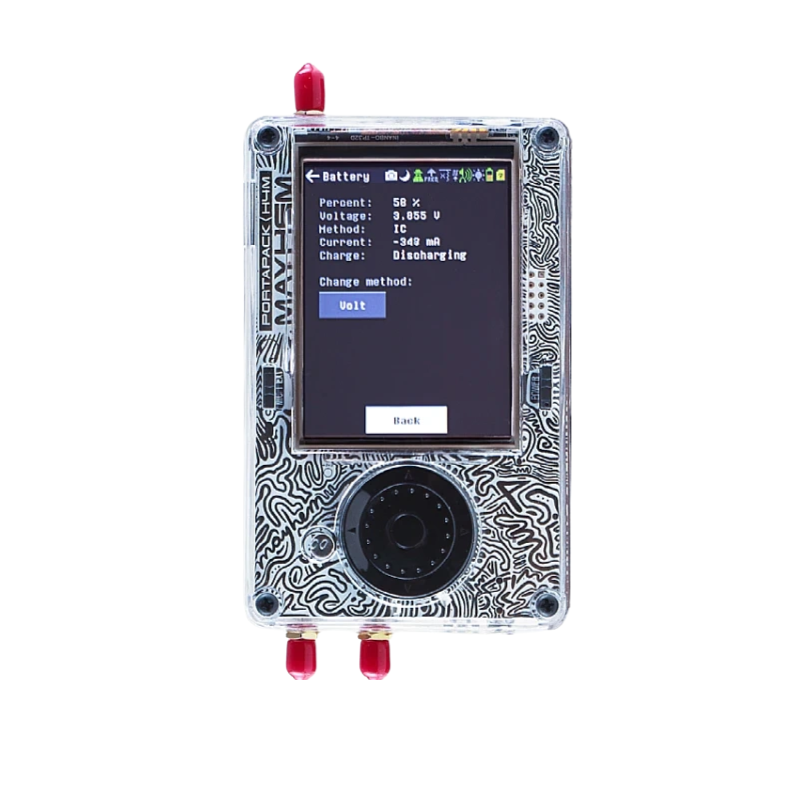
PortaPack adds the screen and controls that let you use certain functions without keeping a computer connected. Compare its model separately from the HackRF: a classic kit with PortaPack serves a different purpose from a bare radio board.
Mayhem is the firmware that provides the applications
Mayhem supplies the PortaPack software environment. The board model, firmware version and files on the microSD card determine which applications can be used. A capability advertised for the radio platform is not automatically available in every menu.
For setup and firmware selection, see the Mayhem project documentation.
Comparison table: classic HackRF One vs HackRF Pro
| Feature | Classic HackRF One | HackRF Pro | Practical difference |
|---|---|---|---|
| Operating range | 1 MHz to 6 GHz | 100 kHz to 6 GHz | The Pro mainly adds possibilities below 1 MHz. |
| Reception and transmission | Half-duplex | Half-duplex | Neither can transmit and receive simultaneously. |
| Standard mode | Up to 20 MS/s, 8-bit I/Q | Up to 20 MS/s, 8-bit I/Q | A common baseline for everyday applications. |
| Frequency reference | Depends on board and accessories | Built-in TCXO | Check whether your classic setup already has one. |
| Programmable logic | CPLD | iCE40 UltraPlus FPGA | Benefits depend on software development. |
| Flash memory | 8 Mbits | 32 Mbits | More space for firmware, not capture files. |
| Reference-design connection | Micro-USB, USB 2.0 | USB-C, USB 2.0 | Some classic variants already have USB-C. |
| RF section and protection | Depends on revision and implementation | Revised design, shielding and reinforced protection | Gain adjustment remains essential. |
| Portable interface of the linked kits | PortaPack H4M | PortaPack H4M Pro | Compare controls and power arrangements separately. |
| Power for the featured H4M Pro | Check the classic kit specification | Replaceable 18650 cell, not included | Allow for a compatible cell for portable use. |
The One entries describe the classic design. Commercial R9, R10 or R10C versions and their accessories may already include some updates. Photos and links show the shop's kits.
HackRF Pro improvements and what they change in practice
100 kHz instead of 1 MHz: useful for low frequencies
The documented operating range changes from 1 MHz–6 GHz for HackRF One to 100 kHz–6 GHz for HackRF Pro. The extension concerns the lower end of the spectrum. If you work at 433 MHz, 868 MHz or 1090 MHz, both generations already cover those frequencies.
If your project involves a transmission below 1 MHz, this becomes a meaningful difference. You will also need an appropriate antenna: compact antennas from a multiband kit do not perform like an installation designed for low frequencies.
Built-in TCXO: holding frequency more consistently
A TCXO is a temperature-compensated crystal oscillator. It reduces variation in the reference used to place signals on the frequency axis. That helps when comparing observations or tuning to a narrow signal.
It does not directly translate into longer range. Check your starting configuration: some HackRF One boards or PortaPack accessories already include a TCXO. The benefit of replacing those differs from upgrading a classic board without that reference.
FPGA and memory: a platform update
Moving from a CPLD to an iCE40 UltraPlus FPGA and increasing Flash from 8 to 32 Mbits mainly affect the architecture and firmware possibilities. They provide more room for embedded development. Users benefit when an application makes use of those resources.
Flash memory is not your capture storage capacity. It holds embedded software; portable recordings use the microSD card where the application supports them.
USB-C, shielding and protection: updated hardware
The Pro uses USB-C while remaining USB 2.0. The connector shape does not mean USB 3.0 or an automatic increase in observed bandwidth. Some One variants also have USB-C.
The Pro platform also advertises a flatter RF response, radio-section shielding and stronger antenna-port protection. These design changes do not replace proper gain adjustment or suitable filtering near strong transmitters.
Technical references: HackRF Pro documentation and HackRF hardware components.
20 MS/s, 8 bits and half-duplex: understanding the numbers
A tunable frequency is not a band monitored continuously
“100 kHz to 6 GHz” describes the frequencies to which the Pro can tune. It does not mean that the entire spectrum appears live on screen at once. Software observes a section around the selected frequency or sweeps through several sections in sequence.
If you alternate between two widely separated bands, a short signal may occur while the receiver is looking elsewhere. To compare solutions, establish how much spectrum is observed at one time and how sweeping works.
Standard mode remains a common comparison point
Both platforms specify up to 20 million samples per second with 8-bit I/Q in standard mode. I and Q represent two signal components that software can use to process modulation and spectrum.
The Pro documentation also describes special modes: extended precision using 16-bit samples at a low rate, and rates up to 40 MS/s using 4-bit samples. This is not a 16-bit, 40 MS/s mode. These functions require firmware and software support; they are not promised in every Mayhem application supplied with the kit.
Half-duplex means receiving or transmitting
HackRF One and HackRF Pro cannot transmit and receive simultaneously. If your project requires observing a link while the same device transmits, check this before buying: an update does not turn this architecture into a full-duplex system.
Special modes are described in the Pro platform documentation. Check support in your software separately.
PortaPack H4M or H4M Pro: working without a PC
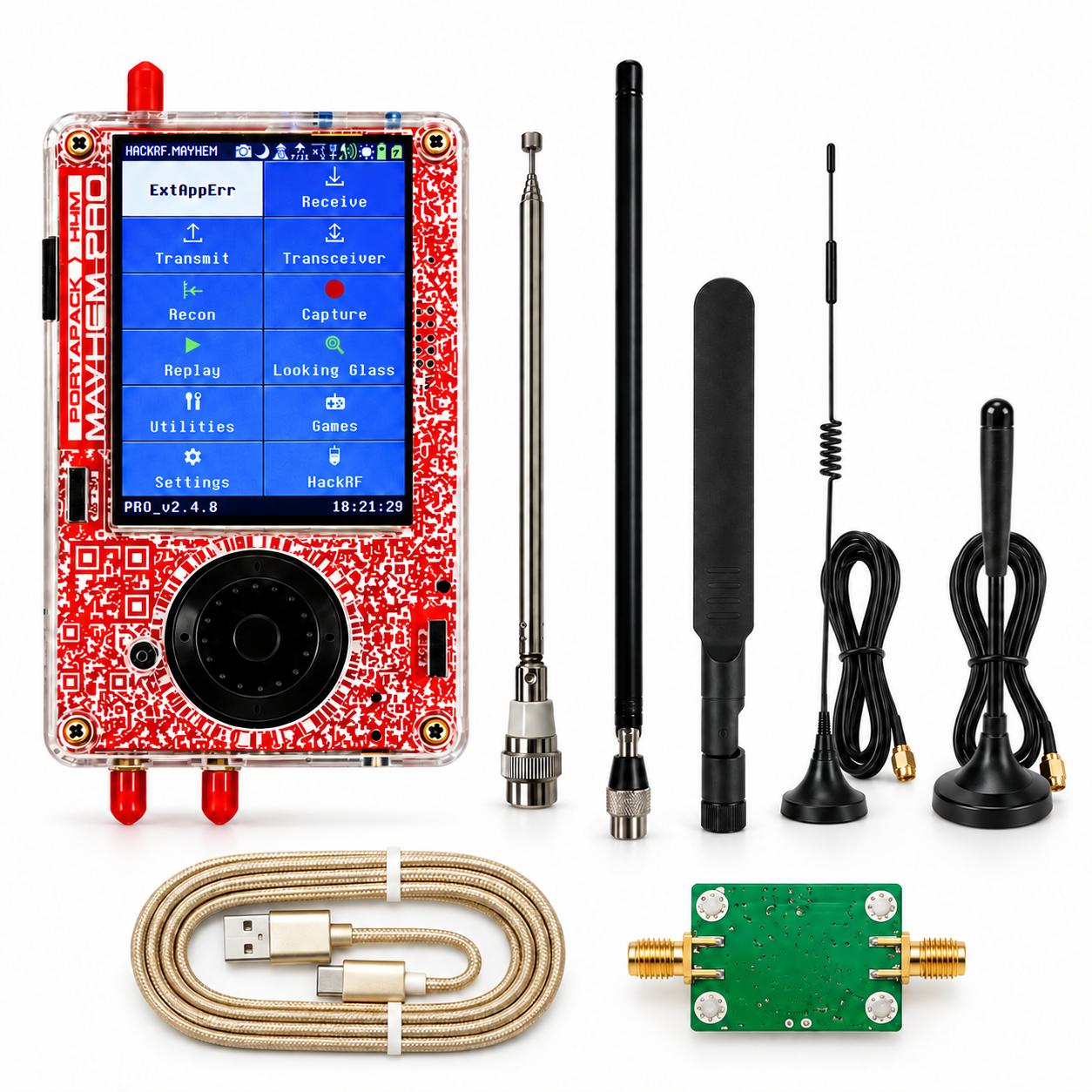
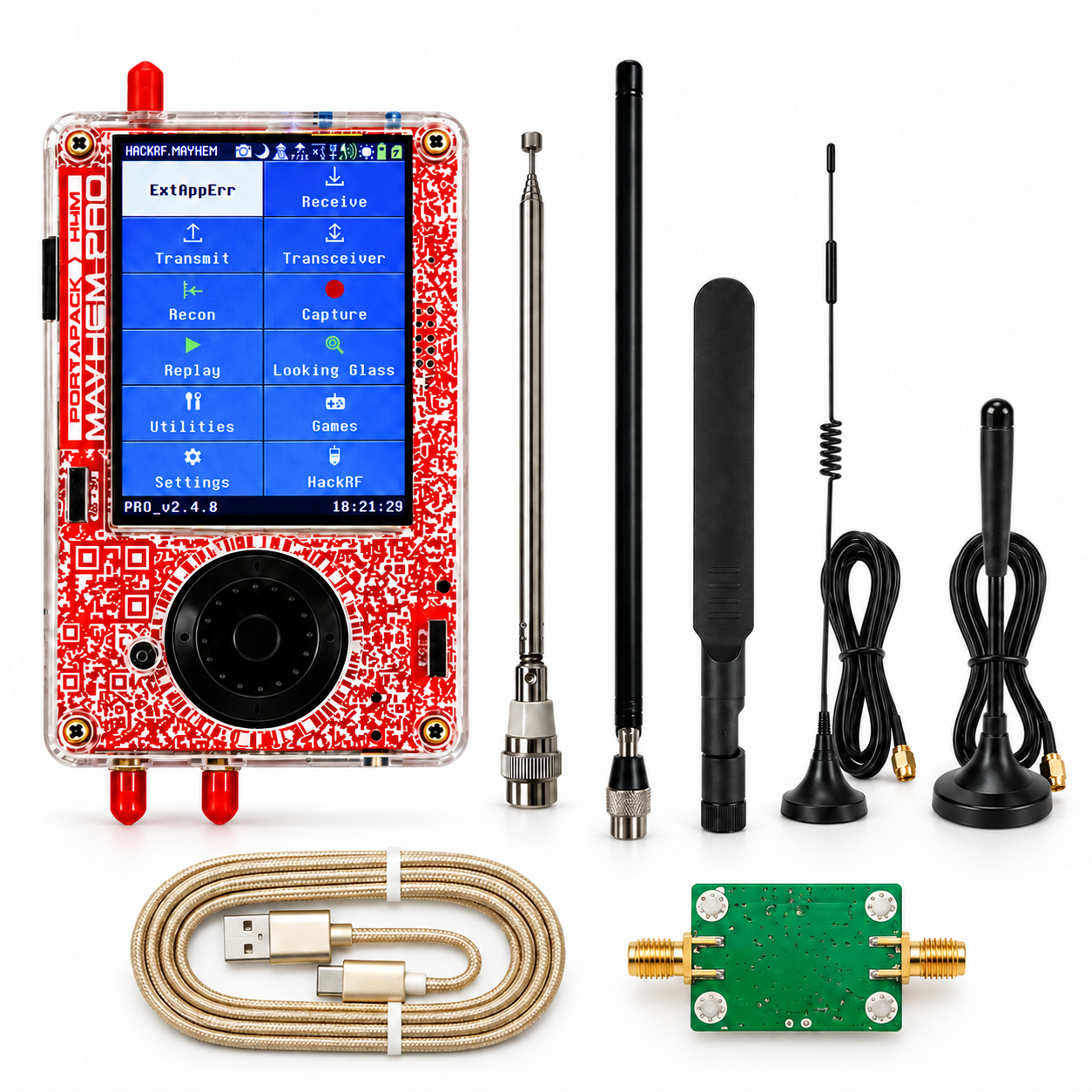
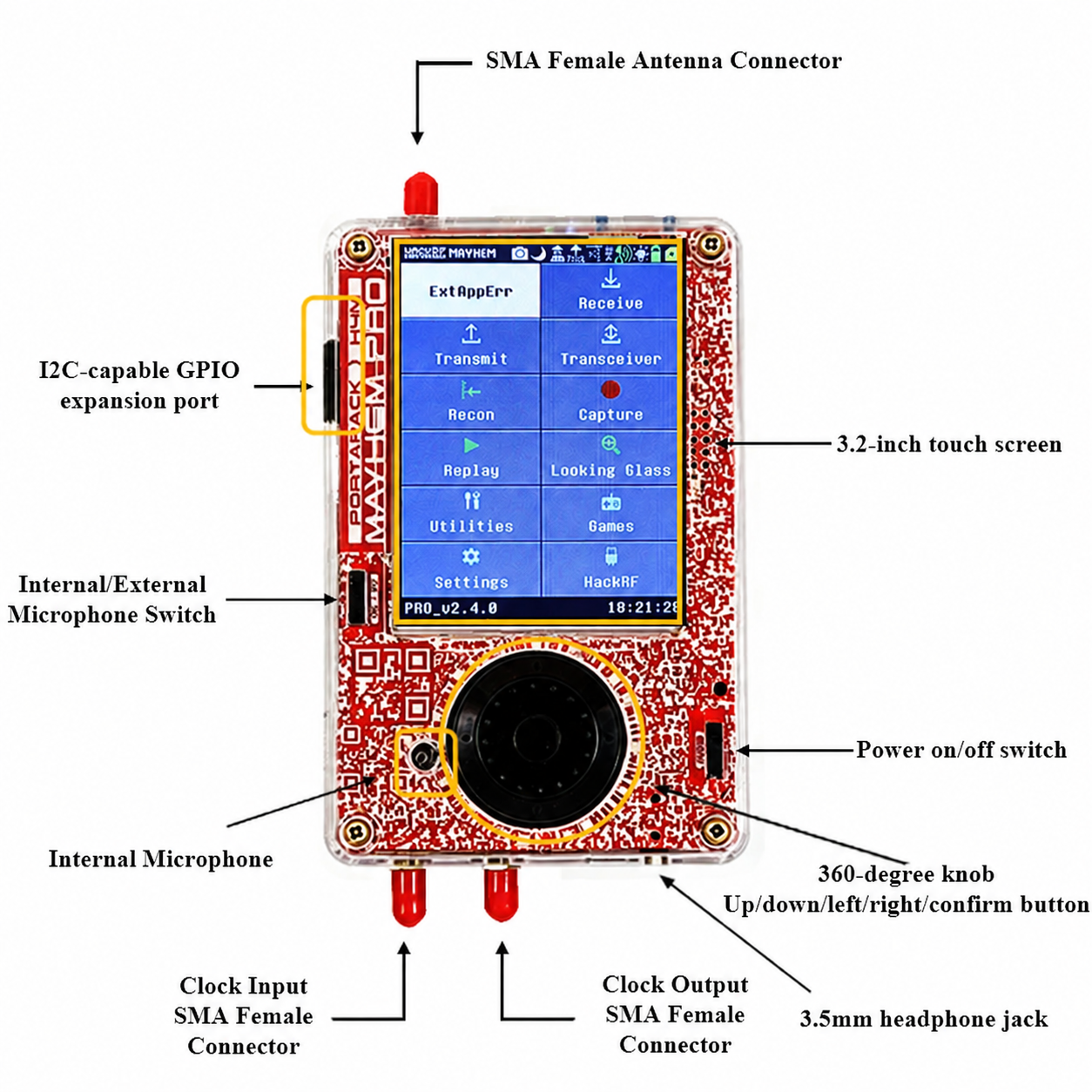
In the field, usability depends as much on the portable interface as on the radio board. The PortaPack H4M Pro in the Pro kit has a 3.2-inch resistive colour touchscreen, a rotary control, physical buttons and built-in audio. Speaker and microSD placement have also been revised.
The most practical change is a replaceable 18650 cell. You can prepare a charged compatible cell for another session. This does not justify a fixed battery-life claim: cell capacity, backlight and application all affect consumption.
The HackRF Pro kit with H4M Pro and five antennas does not include the 18650 cell. The USB-A to USB-C cable and RF amplifier are included. Also check your applications' microSD and firmware-resource requirements.
“Pro” does not mean that every interface component is larger. Compare screen diagonal, controls, connector access and how the battery is replaced. These are details you will use in every session.
What can you do with HackRF Pro or HackRF One?
Understand your radio environment
A useful first exercise is to observe how activity changes within a band. Is a signal continuous, intermittent or present only when you switch your device on? With consistent settings, spectrum and waterfall views help compare these situations. That builds more useful experience than running a sweep without a goal.
Study your 433 or 868 MHz sensors
You can observe transmissions from your own sensors, weather stations or telemetry equipment. An I/Q capture preserves signal information for later examination. Seeing a transmission does not automatically reveal its data format: decoding requires an application suited to the protocol.
Explore reception and ADS-B
Compatible applications support radio reception and, with the right setup, ADS-B at 1090 MHz. Antenna location can make a substantial difference. A useful comparison between classic and Pro keeps the same location, antenna and conditions as far as possible.
Learn signal processing on a computer
Using GNU Radio or other compatible software, you can build a receive chain, inspect modulation and understand filters. Compatibility depends on drivers, versions and functions. A newer board does not remove the learning process.
Support an RF assessment
HackRF can help explore radio activity or preserve an observation. When looking for concealed equipment, a peak alone does not identify its type or location. An assessment requires corroborating observations; silent or non-transmitting devices require other search methods.
Which HackRF suits your needs?
Starting with software-defined radio
Choose a kit whose operation and contents you understand. The classic model remains useful for learning frequency settings, gain and captures. The Pro can also be a first device if you want its built-in reference and newer architecture from the outset. Allow time to learn either one.
Using a portable SDR regularly
Start with the power arrangements, controls and required applications. The H4M Pro's replaceable cell is useful for successive sessions. If you work mainly on a computer, this PortaPack advantage will matter less.
Replacing an already equipped HackRF One
List what you already have: TCXO, antennas, filters, accessories and software. If your One already has a stable reference and does the job, the Pro should answer an identifiable additional need. Upgrading is more justified if you need frequencies below 1 MHz or want to develop for the new architecture.
Compare the kits' contents on their product pages: HackRF One R10C + PortaPack H4M and HackRF Pro + PortaPack H4M Pro.
Getting started: a simple method before comparing performance
- Identify the board and firmware. Record the exact HackRF model, PortaPack model and Mayhem version. Before updating, check that the file is intended for your hardware.
- Choose one experiment. Start with a known signal or equipment you control, in a band suited to the antenna. This makes troubleshooting easier if nothing appears.
- Use a data cable. A USB-C connector does not guarantee data transfer. For computer operation, check device detection before adding software.
- Adjust gains gradually. Avoid starting with every stage at maximum. Compare signal and noise after each change while keeping other settings constant.
- Prepare the microSD card. Resources must match the version in use. A menu entry does not prove that all application files are installed.
- Record the conditions. Note frequency, antenna, gains, sample rate and location. Captures accompanied by this information are easier to interpret.
When comparing two boards, change one parameter at a time. A gain or antenna-position change can create a difference mistakenly attributed to the receiver model.
Mistakes that make a HackRF appear to receive poorly
Adding an amplifier before checking for overload
An RF amplifier can help in some setups, but it also amplifies unwanted signals. Near a strong transmitter, increasing gain may create false peaks or raise noise more than the wanted signal. HackRF documentation recommends gradual gain adjustment; suitable filtering may help more than extra gain.
Choosing an antenna just because it fits
An SMA connector provides a mechanical connection, not suitability for every frequency. An antenna designed for bands at several hundred megahertz does not replace a low-frequency antenna. Check band, orientation and clearance before concluding that the SDR is the limiting factor.
Confusing radio activity with device identification
Activity at 2.4 GHz can have different origins. The spectrum provides clues; protocol, bandwidth and processing tools determine what can be recognised. Neither “Pro” nor Mayhem guarantees universal identification of nearby devices.
For transmission tests, check the conditions applying to the frequency and work with your equipment in an authorised setting. A menu's technical possibilities do not authorise transmission or access to communications.
Before buying: compare the complete kit
To choose between HackRF Pro and HackRF One, compare the supplied hardware, software configuration and your objective. A bare board, a PortaPack kit and an antenna bundle meet different needs.
- The exact radio-board model and generation.
- The included PortaPack and its power arrangements.
- Whether the configuration includes a TCXO.
- The antennas and accessories actually supplied.
- Battery and microSD: included, required or needing preparation.
- The functions supported by the firmware version in use.
The classic model remains relevant for applications its architecture already covers. The Pro brings documented changes whose usefulness depends on your project. The current configurations and prices of both kits are shown below.
Compare the two HackRF kits
FAQ: choosing between HackRF One and HackRF Pro
What is the difference between HackRF One and HackRF Pro?
HackRF Pro extends the lower operating limit from 1 MHz to 100 kHz and adds a built-in TCXO, FPGA architecture and more Flash memory. Both remain half-duplex transceivers. The value of the changes depends on your applications and existing equipment.
Are HackRF Pro and HackRF One Pro the same device?
The platform compared here is called HackRF Pro. HackRF One Pro is sometimes used in searches but can be ambiguous. Check the radio board, PortaPack and kit contents rather than relying only on the commercial name.
Do beginners need HackRF Pro?
No. HackRF One can be suitable for learning SDR settings, observing common bands and making captures. The Pro is useful if its updates match your project. Allow for an antenna, software resources and learning time as well.
Can HackRF Pro be used without a computer?
Yes, with a compatible PortaPack and suitable firmware such as Mayhem, for supported applications. The featured H4M Pro kit requires a compatible 18650 cell, not included. Some functions also require a correctly prepared microSD card.
Can HackRF Pro receive from 100 kHz to 6 GHz all at once?
No. This range describes tuning frequencies. Software observes one section or sweeps several in sequence. A wide sweep may miss a short signal while the receiver examines a different frequency.
Does HackRF Pro operate at 16 bits and 40 MS/s?
No. The documentation describes separate modes: 16-bit samples at a low rate, or up to 40 MS/s with 4-bit samples. Availability depends on software support. A 16-bit format also does not mean 16 bits of effective resolution.
Can HackRF Pro transmit and receive simultaneously?
No. Like HackRF One, it operates half-duplex: receiving or transmitting at any given moment. A software update does not add a second chain for simultaneous operation.
Does Mayhem support every new Pro feature?
Availability depends on firmware version, application and installed microSD resources. Check support for the required function on your hardware. Advertised board capabilities and functions in a Mayhem menu are not interchangeable.
Which antenna should I choose for HackRF Pro?
Choose an antenna suited to the frequency and environment. The five supplied antennas serve different bands; they do not guarantee uniform reception from 100 kHz to 6 GHz. Low frequencies may require a dedicated antenna.
Does HackRF Pro automatically detect spy cameras or microphones?
It can help observe radio activity, but a peak alone does not identify or locate a device. Detection depends on the transmission, antenna, protocol and software. Silent or non-transmitting equipment requires other search methods.
Does a TCXO improve HackRF range?
Its main purpose is to stabilise the frequency reference, particularly against temperature changes. Range depends on many other factors. A TCXO does not replace a suitable antenna or guarantee greater receiving distance.
Is it worth replacing a working HackRF One?
First identify a specific limitation: operation below 1 MHz, frequency drift, portable power or development for the new architecture. If your device already meets your needs, improving the antenna, filtering or settings may be more useful than replacement.
Sources and scope of this comparison
Comparison prepared on 15 October 2026 using documented platform specifications and the featured kit product pages. Software capabilities evolve: check the version and required function before updating.



Comments (0)
Post a comment